The GCHP compute image and Falcon RDMA
A pre-built compute image, gchp1470-full-v2, lets you skip the
multi-hour Spack and library compile on every new cluster. Boot an
H4D node from it and mpicc, mpifort, cmake, plus the
HDF5/netCDF/ESMF/ParallelIO/udunits stack are immediately available
under /opt/gchp. Intel iRDMA is configured so Falcon RDMA works
across nodes with no additional setup.
This page covers what is in the image, how to boot it, and how to roll your own when a new GCHP release calls for it.
1. What is in the image
Field |
Value |
|---|---|
Image name |
|
Image family |
|
Hosting project |
|
Base OS |
Rocky Linux 8.10 (CIQ kernel) |
Disk size |
20 GB |
Architecture target |
|
Suitable machine type |
|
The /opt/gchp tree contains the entire Spack build:
OpenMPI 4.1.6 with
fabrics=ucx schedulers=slurmUCX 1.20.0 with
+verbs +rdmacm +rc +ud +thread_multiplerdma-core 47.1 (with the Rocky-patched Intel iRDMA provider in place; see Section 6 for why this matters)
HDF5 1.14.6 with parallel I/O
netCDF-C 4.10.0 with MPI support
netCDF-Fortran 4.6.2
ParallelIO 2.6.8
ESMF 8.9.1
udunits 2.2.28
cmake 3.31.11
The image does not ship a GCHP binary. Users build their own to match their chosen meteorology (MERRA-2 vs GEOS-FP), chemistry mode (fullchem, transport-only, mass-flux), and any custom code.
The kernel modules idpf and irdma load at first boot via the
included gchp-first-boot.service. After roughly 90 seconds the
node is ready for multi-node MPI.
The image family name embeds the GCHP version the stack was
built and tested against. When a new GCHP release requires a
different ESMF, netCDF, or compiler version, a separate image family
will follow (e.g. gchp15xx-full).
2. Booting the image
In a Slurm-GCP blueprint
Reference the image family from the H4D nodeset:
- id: h4d_nodeset
  source: community/modules/compute/schedmd-slurm-gcp-v6-nodeset
  use: [network]
  settings:
    node_count_dynamic_max: 4
    machine_type: h4d-standard-192
    maintenance_policy: TERMINATE
    instance_image:
      family: gchp1470-full
      project: eece-acag
Slurm-GCP will boot the most recent image in the family whenever it bursts a new node. Boot time is roughly 90 seconds; after that the node is ready for compute.
For a one-off VM
gcloud compute instances create gchp-node \
    --zone=us-central1-a \
    --machine-type=h4d-standard-192 \
    --maintenance-policy=TERMINATE \
    --image-family=gchp1470-full \
    --image-project=eece-acag \
    --network-interface=network=default,subnet=default,nic-type=GVNIC
For multi-node Falcon RDMA, add a second NIC on a Falcon-enabled subnet:
gcloud compute instances create gchp-node \
    --zone=us-central1-a \
    --machine-type=h4d-standard-192 \
    --maintenance-policy=TERMINATE \
    --image-family=gchp1470-full \
    --image-project=eece-acag \
    --network-interface=network=default,subnet=default,nic-type=GVNIC \
    --network-interface=network=gchp-falcon-net,subnet=gchp-falcon-subnet,nic-type=IRDMA,no-address
The Falcon-enabled VPC (gchp-falcon-net in the example) needs to
exist already; see Quickstart II Section 3 for how to create it.
Optional first-boot metadata
The bundled gchp-first-boot systemd unit honours these instance
metadata keys:
Metadata key |
Default |
Effect |
|---|---|---|
|
|
Load |
|
(empty) |
If set, mount this NFS server at first boot |
|
|
NFS share name |
|
|
Where to mount the NFS share |
Cluster Toolkit’s homefs module already handles /shared for
you, so you only need these metadata keys when bringing an existing
Filestore into a fresh project by hand.
3. Using /opt/gchp
A single source puts the whole stack on PATH:
source /opt/gchp/env.sh
which mpicc mpifort cmake
# /opt/gchp/spack/opt/spack/linux-zen4/openmpi-4.1.6-.../bin/mpicc
# /opt/gchp/spack/opt/spack/linux-zen4/openmpi-4.1.6-.../bin/mpifort
# /opt/gchp/spack/opt/spack/linux-zen4/cmake-3.31.11-.../bin/cmake
env.sh also enables gcc-toolset-11 so the toolchain’s
binutils 2.36 is on PATH ahead of the older system
/usr/bin/as. The Spack-built compilers emit assembler options
(--gdwarf-4) that the system binutils does not understand;
without this, the first GCHP compile fails. If you build a custom
image (Section 7) make sure your own env.sh includes
source /opt/rh/gcc-toolset-11/enable near the top.
env.sh also exports the OpenMPI/UCX MCA parameters that select
Falcon RDMA between nodes and shared memory within a node. If you
prefer different transports for debugging, override UCX_TLS
before the next mpirun:
# Multi-node TCP only (good for first connectivity test)
UCX_TLS=self,sm,sysv,posix,tcp mpirun -n 4 ...

# Default: Falcon RDMA + shared memory
source /opt/gchp/env.sh
mpirun -n 4 ...
Building GCHP against this stack is no different from building it on any HPC cluster:
source /opt/gchp/env.sh
cd /shared
git clone --recurse-submodules https://github.com/geoschem/GCHP
cd GCHP
git checkout 14.7.0

cd /shared/GCHP/run
./createRunDir.sh                       # follow the prompts

cd /shared/rundir-<your-name>
mkdir -p build && cd build
cmake -DRUNDIR=.. \
      -DCMAKE_C_COMPILER=mpicc \
      -DCMAKE_CXX_COMPILER=mpicxx \
      -DCMAKE_Fortran_COMPILER=mpifort \
      /shared/GCHP
make -j 30
make install
After make install the gchp binary lives at the top of your
rundir, ready for sbatch.
4. Confirming Falcon RDMA is live
After boot, ibv_devinfo should report PORT_ACTIVE on
irdma0:
$ ibv_devinfo | head -8
hca_id: irdma0
    transport:    InfiniBand (0)
    fw_ver:       1.3705
    state:        PORT_ACTIVE (4)
    max_mtu:      4096 (5)
    active_mtu:   4096 (5)
    link_layer:   Ethernet
A two-rank hello-world is the quickest check that MPI is actually using RDMA, not TCP:
source /opt/gchp/env.sh
UCX_LOG_LEVEL=info mpirun -n 2 -H node1,node2 ./mpi-hello 2>&1 | \
    grep tag
# ucp_context_0 inter-node cfg#2 tag(rc_verbs/irdma0:1)
The rc_verbs/irdma0:1 confirms RDMA. If you see tcp/eth0 the
node fell back to TCP - usually because the IRDMA NIC was not
attached at create time.
Common failures
Symptom |
Likely cause |
Fix |
|---|---|---|
|
A custom image was built without the Rocky iRDMA provider swap |
Re-apply the swap (Section 6) |
|
IRDMA NIC was not attached when the VM was created |
Add a second |
|
The Falcon subnet does not use a |
Re-create the subnet with the correct
|
5. Where Falcon RDMA is offered
As of June 2026, vpc-falcon network profiles exist in these
zones:
asia-southeast1-aeurope-west4-bus-central1-aus-central1-bus-west4-a
For the current list:
gcloud compute network-profiles list | grep falcon
H4D capacity is tighter than common machine families. If
ZONE_RESOURCE_POOL_EXHAUSTED comes back on every try, swap zones
or queue with Dynamic Workload Scheduler Flex Start:
gcloud compute instances bulk create \
    --provisioning-model=FLEX_START \
    --max-run-duration=2h \
    ...
6. Building a custom image
You only need this section to roll a new image, for example when a
new GCHP release lands and the supporting libraries change. To track
a new GCHP version, mint a new image family
(gchp15xx-full) rather than overwriting gchp1470-full.
The recipe is:
Boot a fresh
h4d-standard-192from the previous image:gcloud compute instances create gchp-build \ --zone=us-central1-a \ --machine-type=h4d-standard-192 \ --maintenance-policy=TERMINATE \ --image-family=gchp1470-full \ --image-project=eece-acag
Clone Spack at
/opt/gchp/spackand concretize against thespack.yamlshown below.Run
spack -e gchp-env install --fail-fast -j 80. Onh4d-standard-192the full build takes roughly thirty minutes.Replace the Spack-built Intel iRDMA provider with the Rocky-patched system one. The upstream rdma-core 47.1 ships a generic provider that fails to open the kernel iRDMA device on Rocky Linux 8 because the upstream tarball lacks the Rocky/CIQ patches:
RDMA=$(spack location -i /rdma-core@47.1)
sudo cp /usr/lib64/libibverbs/libirdma-rdmav34.so \
        $RDMA/lib64/libibverbs/libirdma-rdmav34.so
Write
/opt/gchp/env.sh(see the existing one for the layout) and verifysource /opt/gchp/env.sh && mpicc --versionworks.Strip user data: remove the
y_zhuge_wustl_edu-equivalent accounts,/home/*,/etc/machine-id,/etc/ssh/ssh_host_*,/tmp,/var/log/*, shell histories, DHCP leases, journals. The Google guest agent regenerates everything on first boot.Stop the VM, image it, and publish:
gcloud compute instances stop gchp-build --zone=us-central1-a
gcloud compute images create gchp15xx-full-v1 \
    --source-disk=gchp-build \
    --source-disk-zone=us-central1-a \
    --family=gchp15xx-full \
    --description="GCHP 15.x.x compute image, ..."
gcloud compute images add-iam-policy-binding gchp15xx-full-v1 \
    --member='allAuthenticatedUsers' \
    --role='roles/compute.imageUser'
Once the new image is verified, deprecate the previous version:
gcloud compute images deprecate gchp1470-full-v2 \
    --state=DEPRECATED \
    --replacement=gchp15xx-full-v1
Reference spack.yaml
spack:
  specs:
  - cmake
  - binutils
  - udunits
  - ucx +verbs+rdmacm+rc+ud+thread_multiple ^rdma-core@47.1~pyverbs
  - openmpi@4.1.6+pmi fabrics=ucx schedulers=slurm %gcc@11.5.0 ^ucx +verbs+rdmacm+rc+ud+thread_multiple ^rdma-core@47.1~pyverbs
  - hdf5+hl+mpi %gcc@11.5.0 ^openmpi@4.1.6 fabrics=ucx ^ucx +verbs+rdmacm+rc+ud+thread_multiple ^rdma-core@47.1~pyverbs
  - netcdf-c+mpi %gcc@11.5.0 ^openmpi@4.1.6 fabrics=ucx ^ucx +verbs+rdmacm+rc+ud+thread_multiple ^rdma-core@47.1~pyverbs
  - netcdf-fortran %gcc@11.5.0 ^openmpi@4.1.6 fabrics=ucx ^ucx +verbs+rdmacm+rc+ud+thread_multiple ^rdma-core@47.1~pyverbs
  - parallelio %gcc@11.5.0 ^openmpi@4.1.6 fabrics=ucx ^ucx +verbs+rdmacm+rc+ud+thread_multiple ^rdma-core@47.1~pyverbs
  - esmf %gcc@11.5.0 ^openmpi@4.1.6 fabrics=ucx ^ucx +verbs+rdmacm+rc+ud+thread_multiple ^rdma-core@47.1~pyverbs
  view: false
  concretizer:
    unify: false
  packages:
    all:
      require: '%gcc@11.5.0'
    rdma-core:
      require: ['@47.1~pyverbs']
7. Measured performance
These numbers are partly chosen from GCHP 14.7.0 fullchem, 7-day simulations from
2019-07-01, built against this exact stack and run on
h4d-standard-192:
Resolution |
Cores |
Nodes |
Fabric |
Wall time |
Throughput (sim-days/day) |
|---|---|---|---|---|---|
C48 |
96 |
1 |
SHM |
1.4 h |
124 |
C90 |
180 |
1 |
SHM |
2.8 h |
59 |
C90 |
360 |
2 |
Falcon RDMA |
1.8 h |
96 |
C180 |
120 |
1 |
SHM |
16.5 h |
10.2 |
C180 |
240 |
2 |
Falcon RDMA |
8.1 h |
20.8 |
The figure below places every benchmark run in one view, adding the
c2-standard-60 (TCP/gVNIC) baseline alongside h4d-standard-192
across all four resolutions. Lower on the chart is faster. At a given
core count, h4d-standard-192 is consistently faster than
c2-standard-60, and Falcon RDMA lets a two-node H4D run keep
scaling (C90 to ~1.8 h, C180 to ~8.1 h) where TCP would stall. An overall
suggestion is that GCHP users should consider H4D for runs that exceeds
180 cores with high resolution, and enable Falcon RDMA when using multi-node H4D.
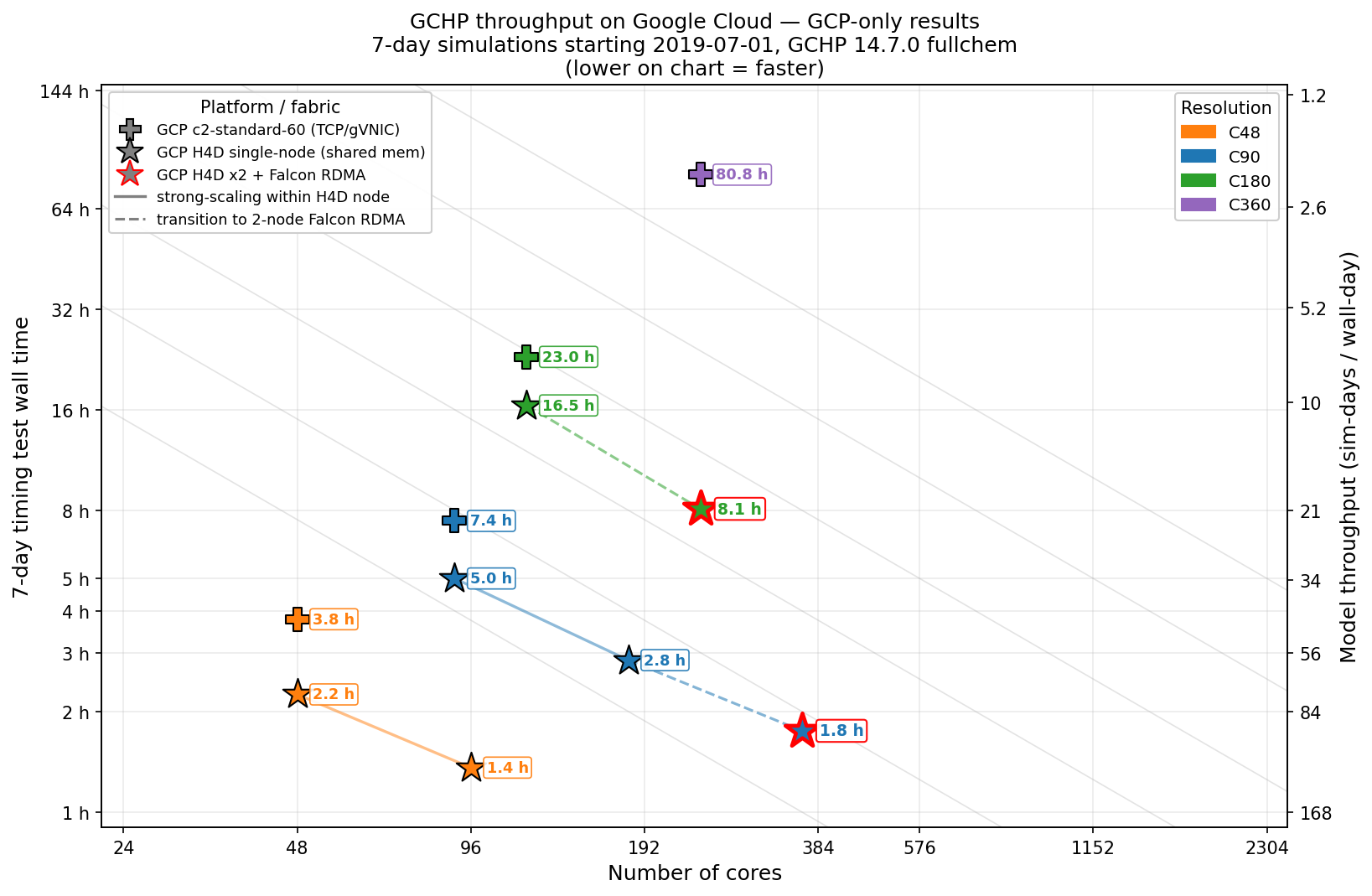
GCHP 14.7 full-chemistry benchmark on Google Cloud – 11 timing runs,
7-day simulations starting 2019-07-01, across four resolutions
(C48-C360) and two instance types. Lower on the chart is faster.
Crosses: c2-standard-60 (TCP/gVNIC). Stars: single-node
h4d-standard-192 (shared memory). Red-edged stars: two
h4d-standard-192 nodes with Falcon RDMA. Solid lines show strong
scaling within a single H4D node; dashed lines the transition to a
two-node Falcon RDMA run.